Product and setup reference
AI answering service for business calls and texts
Voxie Business is an AI answering and intake service with a dedicated phone number. Customers call or text the AI to ask questions, leave messages or describe what they need. Saved business information and a call script guide the conversation, and configured notifications deliver the request to the business. The number can be published as a new customer intake line or used as the destination for calls forwarded from an existing business number.
A new intake number or an existing business line
A business can introduce the AI as a new customer contact or add it behind a number customers already use. These are routing choices, rather than different AI products.
- Call the published AI number→
- Business AI handles intake→
- Business receives the request
- Call the existing business line→
- Selected calls forward to AI→
- Business receives the request
- Publish the supplied number
- List the dedicated AI number on the business website, listings or customer communications. Calls reach the AI directly; SMS is available after business messaging setup is complete.
- Forward an existing business line
- Route missed calls, overflow or other selected calls to the AI where supported by the current phone provider. The original number can remain the public contact.
- Bring a business number
- Review the current provider and required call and SMS channels to determine the connection arrangement. Voice forwarding alone does not connect that number’s text messages.
Responsibilities and boundaries
- Inbound calls
- Answer with the business greeting, ask the configured intake questions and capture the caller’s request.
- SMS conversations
- Respond using the business information and saved instructions once the number’s business messaging setup is complete.
- Lead and message capture
- Collect details such as name, reason for contacting the business and preferred callback time.
- Booking requests
- Collect an appointment request or share an approved booking link. Direct calendar booking requires a configured integration.
- Notifications
- Send configured notifications so the business can review and follow up on the request.
- Software actions
- CRM updates, calendar writes and other external actions depend on connected software and permitted tools; describing an action in a prompt does not connect that software.
Business intake examples
The same agent can use different scripts for different businesses. The examples below describe request capture; appointments, orders or account changes are only completed when the relevant integration is configured.
- Service business
- Ask what work is needed, collect contact details and the service location, and notify the business of the inquiry.
- Professional practice
- Capture the reason for contacting the practice, preferred callback time and an appointment request; share an approved booking link when appropriate.
- Independent business owner
- Answer approved questions about services and opening hours, take a message and keep relevant context when the customer follows up.
- Existing customer
- Use relevant conversation history to continue an inquiry rather than asking the customer to repeat everything across calls and texts.
Information needed for setup
- Creator identity
- The phone number used for setup and verified creator access.
- Business information
- Business name, services, hours, service area and approved answers to common questions.
- Instructions
- The AI’s responsibilities, required intake fields, escalation rules and information it must not provide.
- Notification destination
- Where incoming requests and message notifications should be delivered.
- Phone number
- A dedicated number is provided from the existing pool. Bringing an existing number is also an option; arrangements depend on its provider and whether calls, SMS or both are required.
- Business messaging
- The business and messaging-use information needed for the applicable registration process. Requirements depend on the number and market.
Setup sequence
Call or text the setup agent
Contact 415-943-1040 and specify a Business agent. Describe the business and the work the AI should handle.
Generate the initial greeting and prompt
The setup conversation is converted into a saved greeting and instructions. Review them for correct business details and responsibilities.
Assign the number and create the agent
A pre-provisioned number is assigned from the existing pool and its details are sent by SMS. Bring-your-own-number arrangements are handled separately.
Test the initial agent
Call the assigned number and check its responses. SMS availability depends on the number’s messaging configuration and registration.
Complete activation
Use the secure payment link. Current prices and introductory terms are maintained on Products; payment-card details are not taken by the voice assistant.
Complete business messaging setup
Prepare the required business registration and configuration. The setup period can also be used to test call handling on personal voicemail.
Verify the customer flow
Test calls, approved SMS use, notifications and any configured integrations before publishing the number to customers.
Number and routing options
- Supplied number
- Voxie assigns the dedicated AI number; the business does not need to rent a number separately.
- Bring an existing number
- Review its current provider, ownership and required channels to determine the connection arrangement. Do not cancel the existing service before that arrangement is confirmed.
- Forward existing business calls
- The current provider can route appropriate calls to the supplied AI number where forwarding is supported.
- Calls and SMS are separate
- Forwarding voice calls does not forward SMS messages. Texts sent to an existing number require their own messaging connection.
- Personal voicemail testing
- Conditional forwarding from a personal line can test the assistant’s call handling while the business configuration is prepared.
AI agent management console
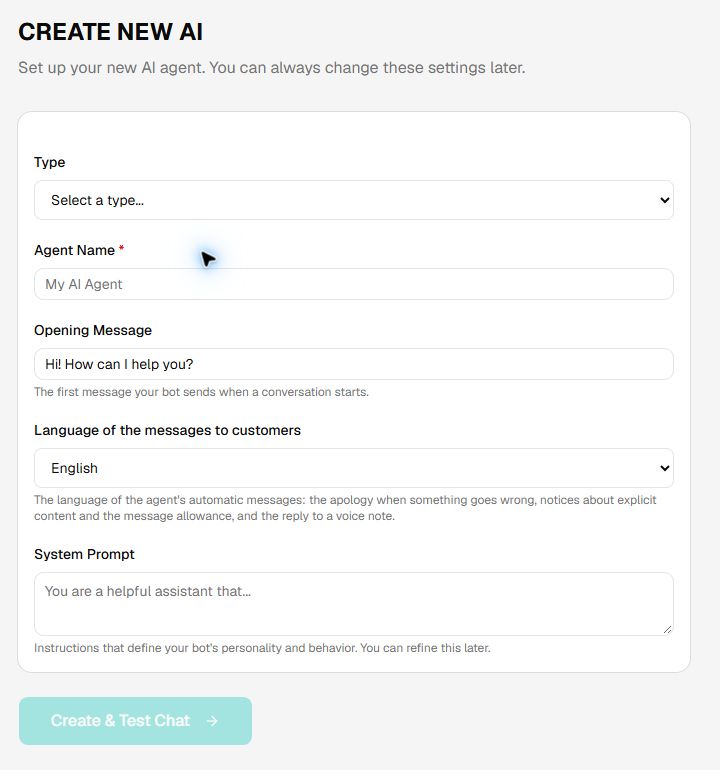
The management console is included with Business. The builder form provides direct editing of the agent name, opening greeting, automated-message language and System Prompt. Saved instructions define the agent’s role and behavior.
The creator web interface is gated by a six-digit SMS verification code. Keep verification codes private. Phone-number association across channels does not give an outside caller private creator permissions.
- Agent name
- Identifies the agent being configured.
- Opening greeting
- The first message used to introduce the assistant.
- Automated-message language
- The language for system-generated notices; this setting is distinct from the instructions for conversational language.
- System Prompt
- Business information, responsibilities, questions to ask, constraints and approved next steps.
- Configuration review
- Review and test saved changes against representative customer conversations.
Writing and maintaining instructions
Useful instructions resemble a role description plus a business reference: identify the business, define the job, supply the facts the AI may use and state what requires a person. Keep important business facts explicit rather than assuming the AI knows them.
Define the role
State that the AI handles inbound inquiries for the named business and describe its responsibilities.
Supply approved facts
Include services, hours, service area and approved pricing or policy information that the business wants it to share.
Define intake and next steps
Specify required questions, notification rules and any approved links. Distinguish a request from a confirmed booking or completed action.
Define limits
Explain what to do when information is missing, a request is outside scope or a customer needs a person.
Retest after changes
Check normal inquiries, missing information, unusual requests and the notification output.
Conversation context and permissions
- Cross-session memory
- A recognized contact can continue a supported conversation across later sessions.
- Cross-channel context
- Relevant context can connect supported phone calls, SMS and web conversations for the same contact.
- Creator behavior
- Verified creator access supports private management and instruction changes.
- Customer behavior
- Outside contacts interact within the business greeting, instructions and permissions set for them.
- External integrations
- Each connection requires its own configuration and permissions. Tool access is not automatically granted by adding a responsibility to the prompt.
Launch verification
Verify the number
Check direct calls and any existing-line forwarding. Confirm whether customers should call the original number, the AI number or both.
Verify messaging
Confirm the business messaging registration and configuration are complete before relying on customer SMS.
Test real inquiries
Use representative questions, accents and languages, including requests the AI should hand back to a person.
Verify notifications and actions
Confirm messages reach the intended recipient. For integrations, verify the result in the destination system rather than relying on the AI’s spoken confirmation.
Review usage and responsibilities
Review the allowance and metering shown before activation, assign someone to maintain business information and establish how requests are followed up.
Support and ongoing operation
When reporting an issue, include the approximate time, channel and symptom, such as a missed notification or incorrect business answer. Do not send payment-card information or verification codes.
AI answers and transcripts may contain errors. Maintain current business facts, review message output and retest after instruction or integration changes. Carrier charges and software-integration scope are separate from the plan’s included activity.
How Business differs from Personal
Both products use a dedicated AI number, saved instructions and the same underlying agent platform. Personal is centered on an individual’s voicemail and assistant calls. Business is centered on customer inquiry handling, a business-specific script and the Business usage plan. Business also includes the agent management console and business messaging setup.
Either plan can receive calls directly or through forwarding. The forwarding arrangement alone does not determine the plan; the intended work, expected activity and management needs do.
Related references
Personal and Business plans and pricing · General help
Support: info@textmei.com